> ## Documentation Index
> Fetch the complete documentation index at: https://rive-debug-panel.mintlify.site/llms.txt
> Use this file to discover all available pages before exploring further.
# Sidebar
> Use the sidebar to access editor panels and organize your workspace.
export const VideoEmbed = ({src}) => {
return
;
};
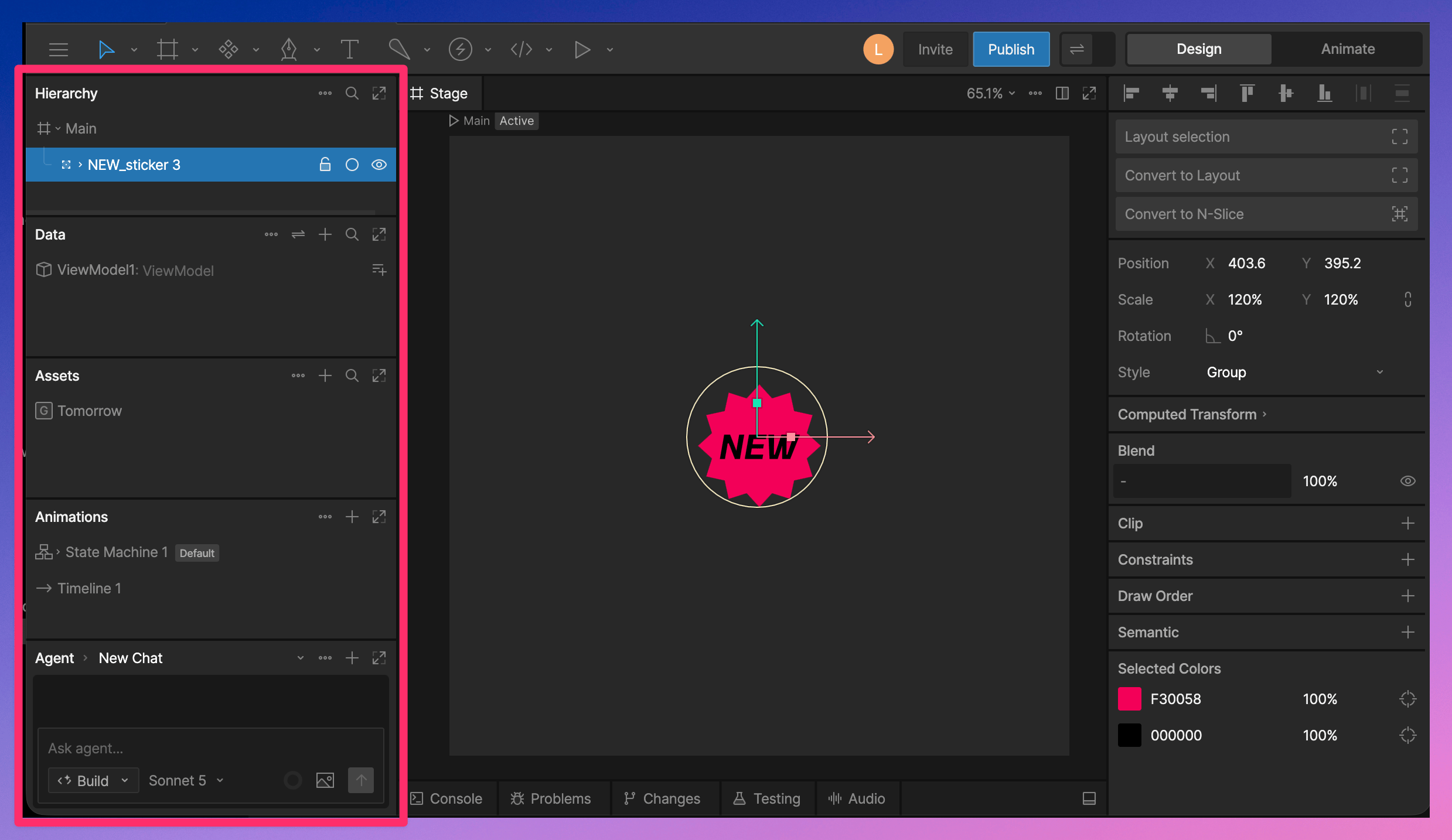
The sidebar is the left side of the editor. It contains panels for navigating your file, managing assets, working with data, editing animations, and using the AI Agent.
 ## Panels
The sidebar includes several panels:
* [Hierarchy](/editor/interface-overview/hierarchy) - View and organize the objects in your file.
* [Data](/editor/data-binding/overview) - Create and manage View Models, properties, and data binding.
* [Assets](/editor/fundamentals/assets-overview) - Manage images, fonts, audio, and other assets used in your file.
* [Animations](/editor/animate-mode/animate-mode-overview) - Create and manage animations and State Machines.
* [Agent](/editor/ai-agent/ai-agent) - Use the AI Agent to help create, edit, and explore your file.
## Panel Options
Use the **…** menu on a panel to access options such as filtering, sorting, collapsing the panel, or resetting the sidebar layout.
## Organizing Panels
You can customize how panels appear in the sidebar.
* Toggle full sidebar height.
* Drag panels to change their order.
* Drag a panel into its own column.
### Open AI Agent in Viewport
The Agent panel also has an option to open in the viewport, where it appears alongside the Stage or Script panel.
## Panels
The sidebar includes several panels:
* [Hierarchy](/editor/interface-overview/hierarchy) - View and organize the objects in your file.
* [Data](/editor/data-binding/overview) - Create and manage View Models, properties, and data binding.
* [Assets](/editor/fundamentals/assets-overview) - Manage images, fonts, audio, and other assets used in your file.
* [Animations](/editor/animate-mode/animate-mode-overview) - Create and manage animations and State Machines.
* [Agent](/editor/ai-agent/ai-agent) - Use the AI Agent to help create, edit, and explore your file.
## Panel Options
Use the **…** menu on a panel to access options such as filtering, sorting, collapsing the panel, or resetting the sidebar layout.
## Organizing Panels
You can customize how panels appear in the sidebar.
* Toggle full sidebar height.
* Drag panels to change their order.
* Drag a panel into its own column.
### Open AI Agent in Viewport
The Agent panel also has an option to open in the viewport, where it appears alongside the Stage or Script panel.